HiDPI in Eclipse: A deep intervention with lasting impact
Published 7 April 2026
Published 7 April 2026
Why modern multi-monitor setups require new UI concepts in the Eclipse architecture – and how a practical solution emerged for Vector Informatik that, via the Eclipse platform, benefits many software providers and thousands of products. A look behind the scenes shows how Vector and Yatta further developed the Eclipse platform for greater stability, backwards compatibility, and usability.
Vector Informatik is an international provider of software tools and components for the development of embedded electronic systems, with a strong focus on the automotive industry. Around 4,500 employees support customers worldwide in the development, networking, and validation of electrical/electronic systems.
PREEvision is Vector's product for system design within their tool ecosystem. The software is based on the Eclipse Rich Client Platform (RCP) and enables end-to-end modeling of software-defined, cyber-physical systems—from requirements through system architecture down to the wiring harnesses. PREEvision is currently developed exclusively for Windows and is used by both customers and internally within Vector’s own product development.
With the proliferation of high-resolution monitors and heterogeneous multi-monitor setups, the demands on PREEvision’s user interface grew. Different pixel densities and monitor-specific zoom settings under Windows meant that UI scaling was correctly set for the primary monitor at application startup but became blurry when windows were moved to other monitors.
The Eclipse Platform did not offer a satisfactory solution for the products using it, such as PREEvision. The existing software architecture for UI scaling proved to be highly limiting—both for users and for the further development of the Eclipse IDE itself.
The core technical challenge was to enable monitor-specific UI scaling within the Eclipse platform without affecting existing products. Eclipse serves as a framework for thousands of applications, so neither regressions nor API breaks could be tolerated.
The new functionality was therefore deliberately implemented as an optional feature that could be integrated incrementally. The goal was to ensure continuous stability and compatibility without disruption. At the same time, the effort required to adapt existing products was to be kept to a minimum. Adding to the complexity, fundamental design decisions of the platform – such as the underlying coordinate system – were only partially compatible with monitor-specific scaling and had to be either fundamentally reconsidered or pragmatically worked around.
The project also posed organizational challenges. Development took place in an open-source context and required close collaboration with Vector and other committers within the Eclipse project. The developers worked as a team and maintained close technical contact with other stakeholders to make key technical decisions transparently and efficiently.
Together, Vector and Yatta developed monitor-specific UI scaling for Windows directly within the Eclipse Platform Project. This scaling ensures a sharp, zoom-compliant display on all connected displays, particularly after switching monitors. The solution is implemented as the default mode but can be disabled if needed.
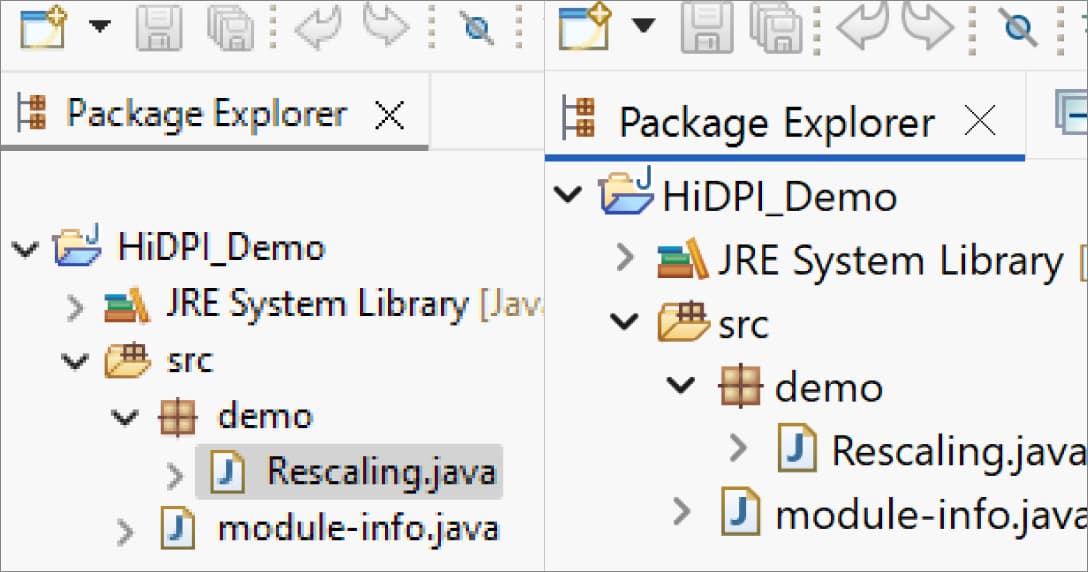
With the HiDPI improvement (right), the display is significantly sharper than without it (left). (Image: Yatta for heise developer)
At the same time, the integration of Edge/WebView2 into Eclipse-based products was also extended, replacing the previously used Internet Explorer as the embedded browser. Until that point, Internet Explorer was still the default on Windows, and it did not handle monitor-specific scaling well. In addition, the GEF Classic diagram framework was adapted to support pixel-precise rendering in line with the new scaling logic.
The implementation was carried out entirely through corresponding open-source releases; the parties deliberately refrained from using proprietary, unpublished patches. This also significantly improved the foundation for further Eclipse-based—and therefore open-source—software products.
The new scaling functionality is available in the February 2026 release of PREEvision 26.0 and has already been successfully used in an internal PREEvision derivative since September 2025. Following Eclipse release 2025-06, it is now established as the default setting and has proven stable across multiple releases.
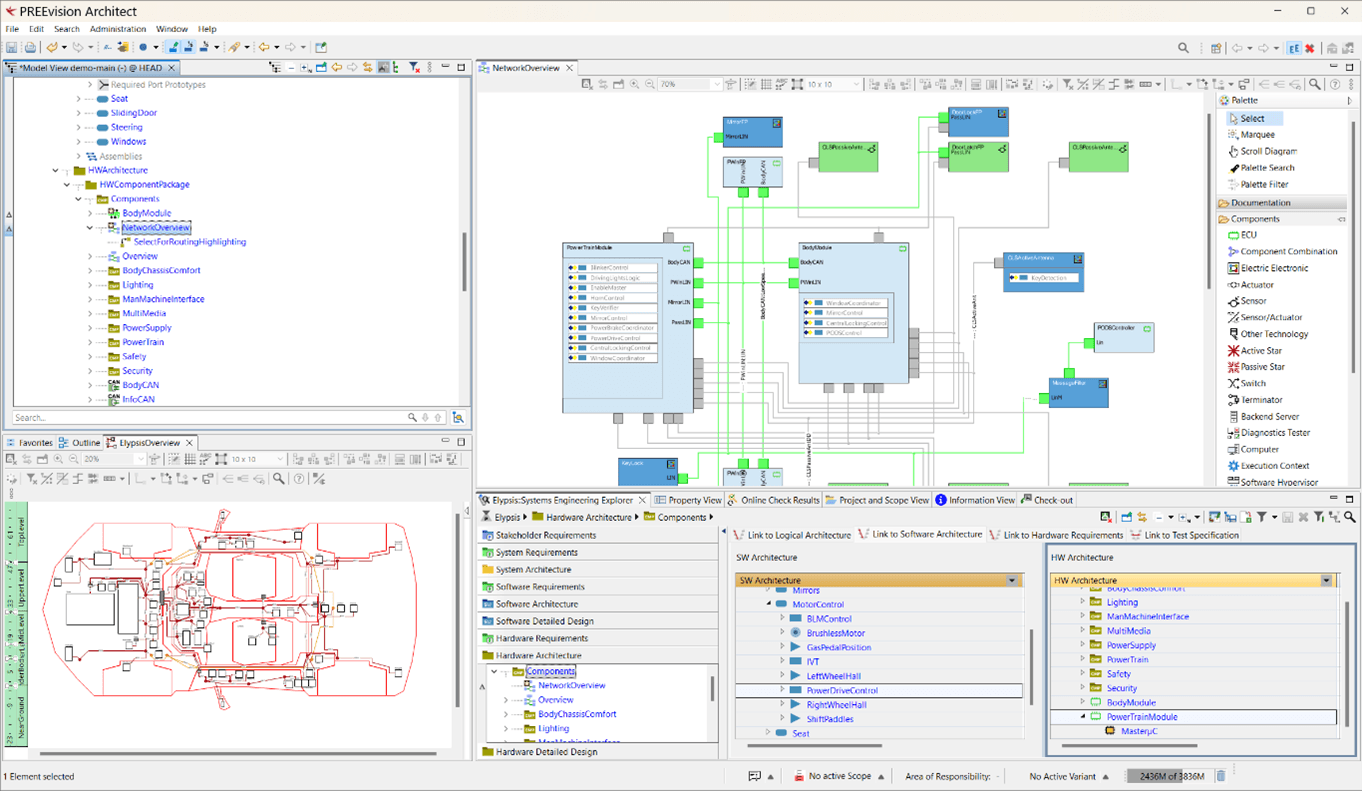
Screenshot of PREEvision showing the various types of controls and editors. (© Vector Informatik)
Beyond the functionality itself, the intensive development work has led to a noticeable revitalization of the Standard Widget Toolkit (SWT). For Vector, this means not only more satisfied users, but also a modernized technical foundation and deeper expertise for the long-term maintenance of the Eclipse platform as the basis of PREEvision.
“Working with Yatta has enabled us to permanently resolve a long-standing technical deficit in the Eclipse platform. The consistent open-source approach was particularly valuable in this regard: the new monitor-specific UI scaling is stable, backwards-compatible, and can now be used as standard—not just for PREEvision, but for the entire Eclipse community.” —Heiko Klare, Senior Manager Software Development, Vector Informatik GmbH
Accompanying the project, the editorial team at heise.de published a technical article in March 2025 that sheds light on the development of monitor-specific UI scaling from a technical perspective. In the article, Yatta Software Engineer Amartya “Marty” Parijat describes the technical and architectural limitations of the existing Eclipse implementation, discusses rejected solutions, and explains why certain design decisions were necessary to ensure stability, backwards compatibility, and optionality.
Using concrete examples, the article illustrates how the new mechanisms affect SWT and related components, and what lessons can be drawn for the further development of large open-source platforms.
Read the entire technical article: https://www.heise.de/en/background/Eclipse-IDE-Sharp-on-all-monitors-with-HiDPI-display-10326913.html
See all